


Strategy
Strategy
Strategy
Integrating your trading strategy
Integrating your trading strategy
Integrating your trading strategy
Lesson 2
Lesson 2
15 min
15 min
Strategy Overview
Strategy Overview
Strategy Overview
Strategies in TradeZella are predefined steps for the model you trade. Each model taught in this mentorship has specific steps from top to bottom that must be followed. Strategies allow you to track followed rules and keeps you aligned with the correct process. Later in this lesson, we will show you how to best put this tool to use.
Strategies in TradeZella are predefined steps for the model you trade. Each model taught in this mentorship has specific steps from top to bottom that must be followed. Strategies allow you to track followed rules and keeps you aligned with the correct process. Later in this lesson, we will show you how to best put this tool to use.
Strategies in TradeZella are predefined steps for the model you trade. Each model taught in this mentorship has specific steps from top to bottom that must be followed. Strategies allow you to track followed rules and keeps you aligned with the correct process. Later in this lesson, we will show you how to best put this tool to use.
Duplication to Account
Duplication to Account
Duplication to Account
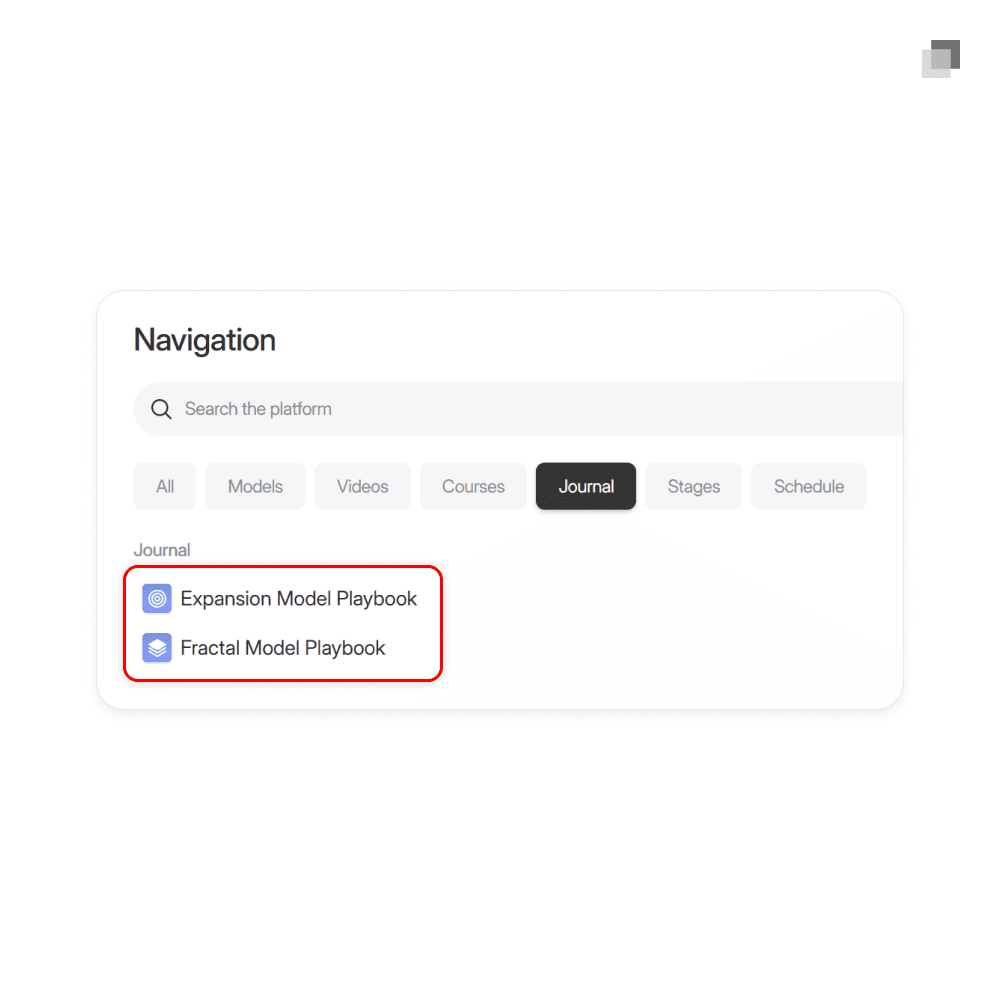
Within the journal section of the home page navigation in this platform, you will find premade strategies for both models. After clicking on the model, you will be redirected to TradeZella. Click the duplicate to my strategy button in the top right corner of the page to input the strategy to your account. This is a quick and simple way to get started.
Within the journal section of the home page navigation in this platform, you will find premade strategies for both models. After clicking on the model, you will be redirected to TradeZella. Click the duplicate to my strategy button in the top right corner of the page to input the strategy to your account. This is a quick and simple way to get started.
Within the journal section of the home page navigation in this platform, you will find premade strategies for both models. After clicking on the model, you will be redirected to TradeZella. Click the duplicate to my strategy button in the top right corner of the page to input the strategy to your account. This is a quick and simple way to get started.
Creating and Editing
Creating and Editing
Creating and Editing
While you are provided the template strategies created by your mentors which can be duplicated to your TradeZella account, you still have the option to create a strategy from scratch or edit an existing one. It is common as you gain experience around the models that certain steps may begin to become more tailored to you. Also, some members blend concepts from both models into their own unique approach.
While you are provided the template strategies created by your mentors which can be duplicated to your TradeZella account, you still have the option to create a strategy from scratch or edit an existing one. It is common as you gain experience around the models that certain steps may begin to become more tailored to you. Also, some members blend concepts from both models into their own unique approach.
While you are provided the template strategies created by your mentors which can be duplicated to your TradeZella account, you still have the option to create a strategy from scratch or edit an existing one. It is common as you gain experience around the models that certain steps may begin to become more tailored to you. Also, some members blend concepts from both models into their own unique approach.
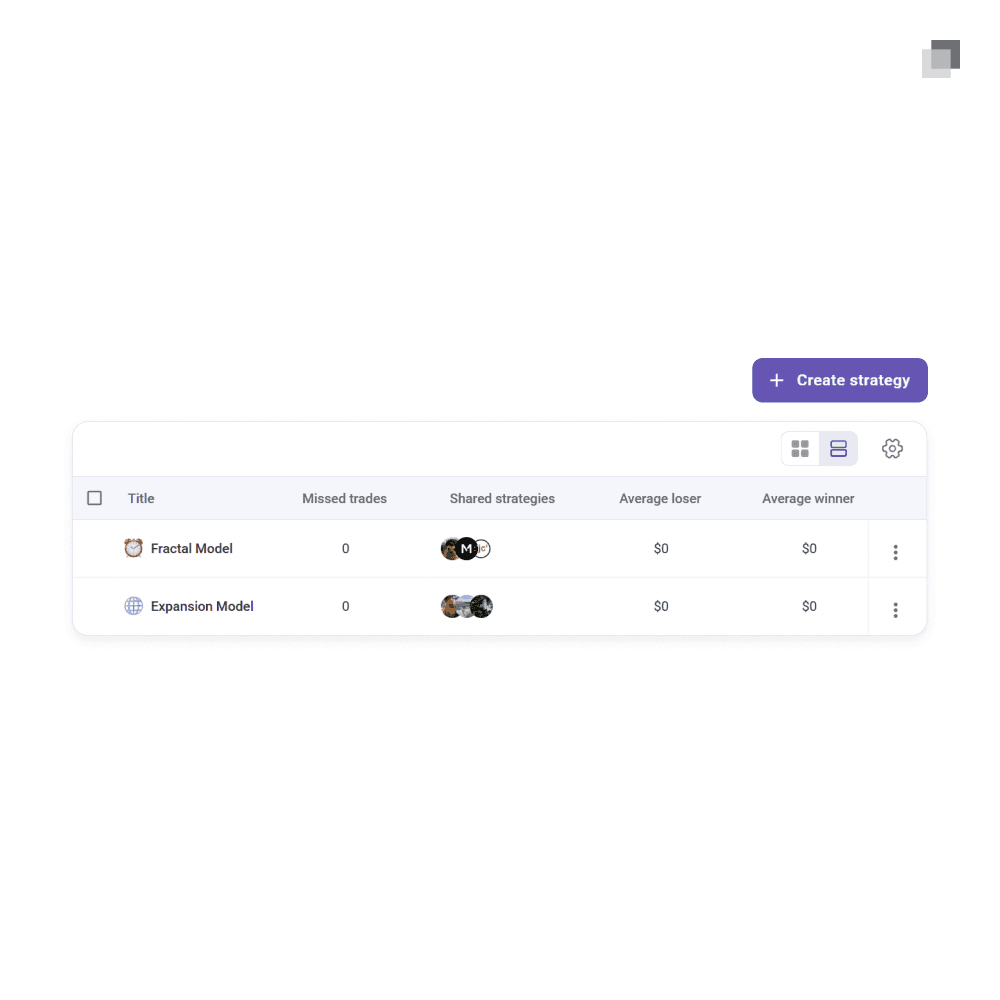
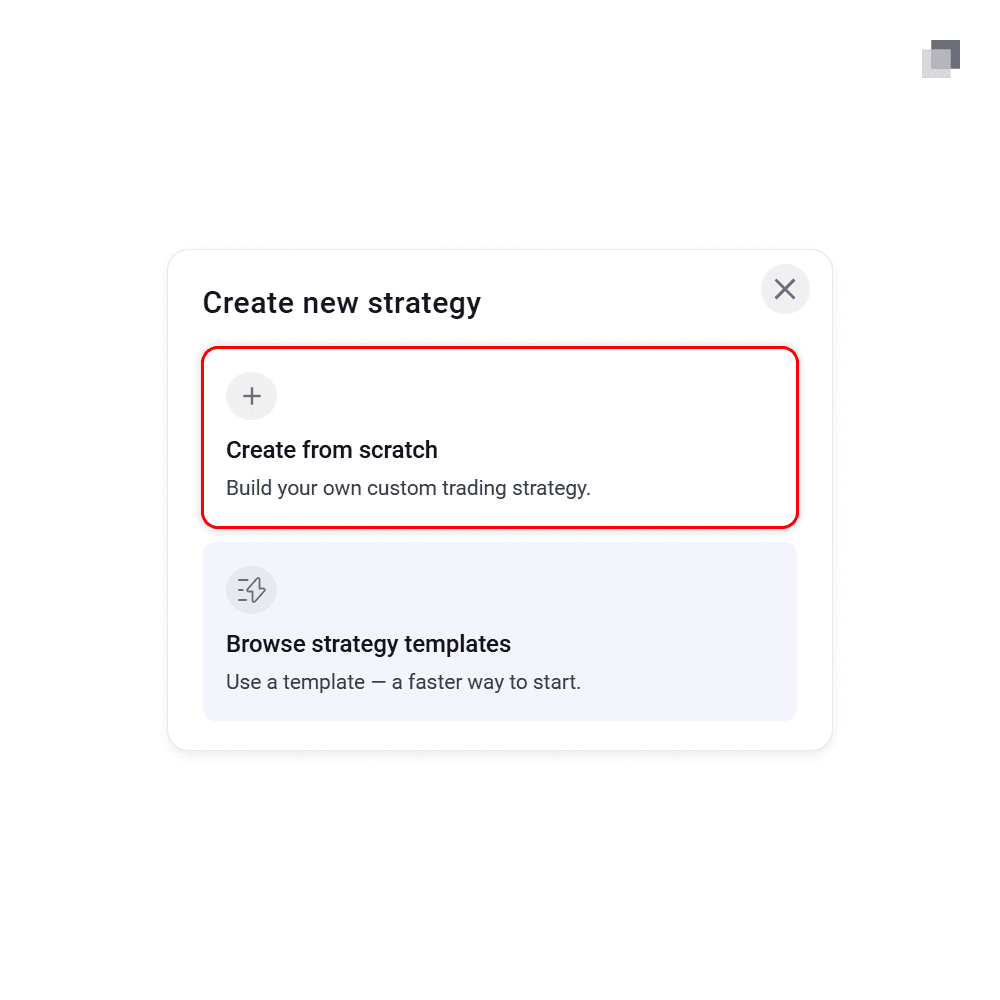
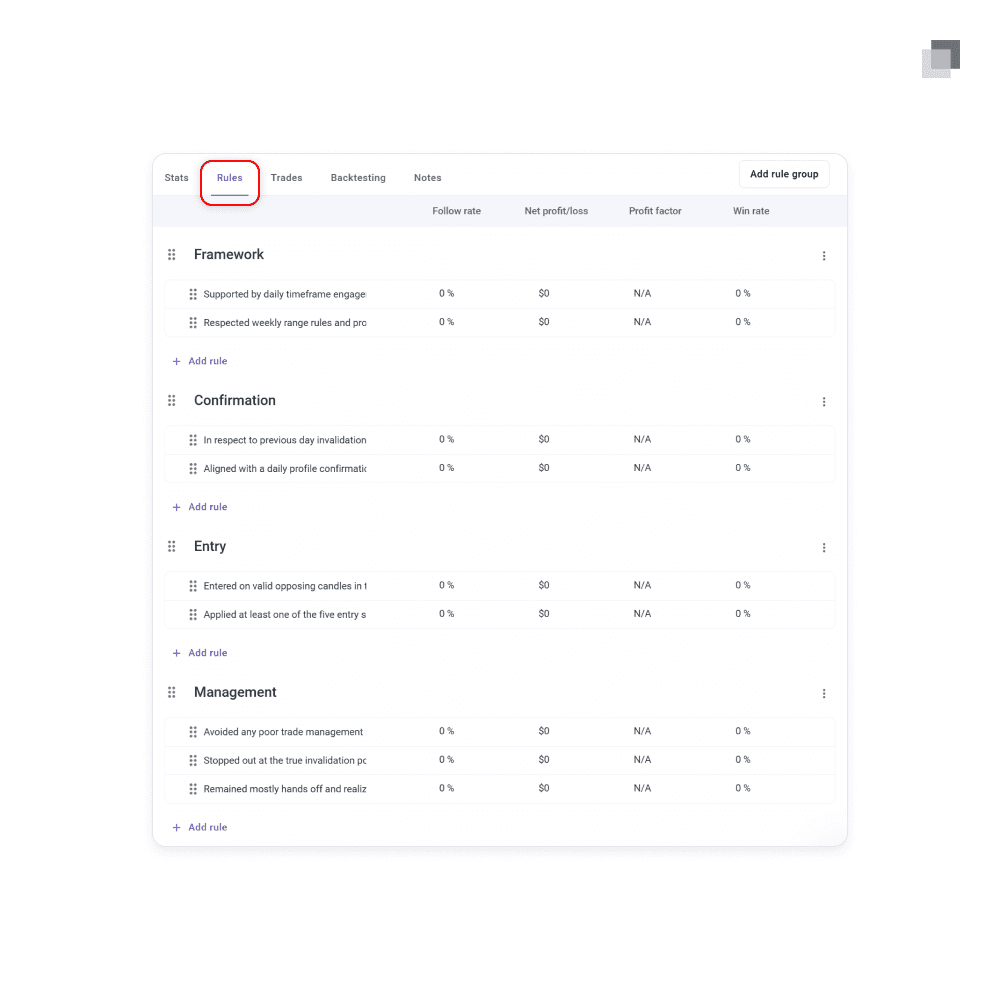
To create a new strategy, navigate to the strategies tab within TradeZella. Click the create strategy button in the top right of the page and create from scratch. Fill out the general info to your preference and then find your way to the rules section. This is where you will define the rule groups and criteria within. The rule group is considered the label for a set of steps. For example, having four groups named bias, confirmation, entry, trade management. Then within those groups, you write in the specific model steps to follow in the order they take place during execution.
To create a new strategy, navigate to the strategies tab within TradeZella. Click the create strategy button in the top right of the page and create from scratch. Fill out the general info to your preference and then find your way to the rules section. This is where you will define the rule groups and criteria within. The rule group is considered the label for a set of steps. For example, having four groups named bias, confirmation, entry, trade management. Then within those groups, you write in the specific model steps to follow in the order they take place during execution.
To create a new strategy, navigate to the strategies tab within TradeZella. Click the create strategy button in the top right of the page and create from scratch. Fill out the general info to your preference and then find your way to the rules section. This is where you will define the rule groups and criteria within. The rule group is considered the label for a set of steps. For example, having four groups named bias, confirmation, entry, trade management. Then within those groups, you write in the specific model steps to follow in the order they take place during execution.
Existing strategies can also be edited. Click on the strategy and move to the rules tab. There you have the ability to add, remove, or edit any rules.
Existing strategies can also be edited. Click on the strategy and move to the rules tab. There you have the ability to add, remove, or edit any rules.
Existing strategies can also be edited. Click on the strategy and move to the rules tab. There you have the ability to add, remove, or edit any rules.
Attaching Trades
Attaching Trades
Attaching Trades
Strategies in TradeZella are more than just a list of steps to follow. They have real function when utilized properly. Strategies are meant to be attached to each trade placed inside of your account.
Strategies in TradeZella are more than just a list of steps to follow. They have real function when utilized properly. Strategies are meant to be attached to each trade placed inside of your account.
Strategies in TradeZella are more than just a list of steps to follow. They have real function when utilized properly. Strategies are meant to be attached to each trade placed inside of your account.
When inside the detailed view of an individual trade, move to the strategy tab which can be found in the top left. Click the add strategy button and select the one which applies to the trade execution. Once added, check off all the rules that were followed and your selections will be saved automatically.
When inside the detailed view of an individual trade, move to the strategy tab which can be found in the top left. Click the add strategy button and select the one which applies to the trade execution. Once added, check off all the rules that were followed and your selections will be saved automatically.
When inside the detailed view of an individual trade, move to the strategy tab which can be found in the top left. Click the add strategy button and select the one which applies to the trade execution. Once added, check off all the rules that were followed and your selections will be saved automatically.
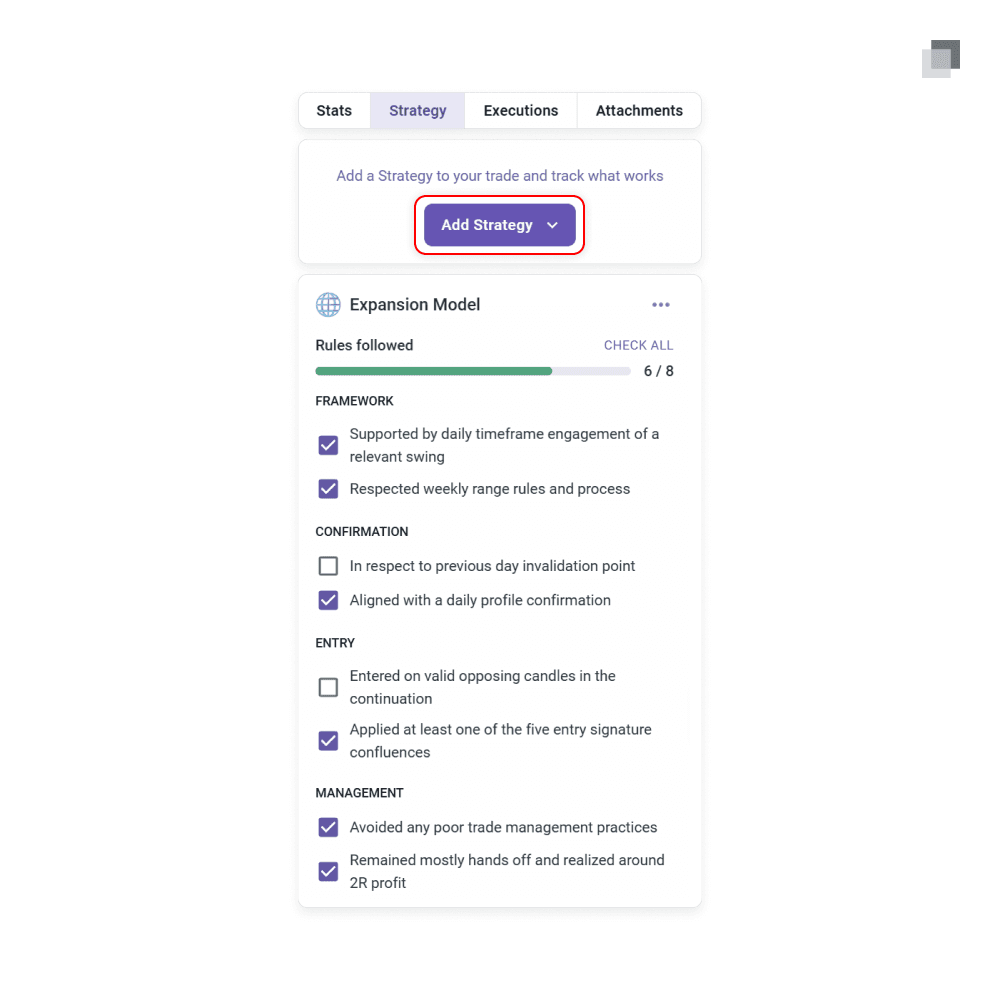
Your process should include this step daily or weekly as trades are imported into your TradeZella account. The next part of this lesson will explain why this is crucial to do.
Your process should include this step daily or weekly as trades are imported into your TradeZella account. The next part of this lesson will explain why this is crucial to do.
Your process should include this step daily or weekly as trades are imported into your TradeZella account. The next part of this lesson will explain why this is crucial to do.
Strategy Stats
Strategy Stats
Strategy Stats
The purpose of attaching strategies to each of your trades and checking off the followed rules shows its value in the data. There are two ways to see the performance of your strategies.
The purpose of attaching strategies to each of your trades and checking off the followed rules shows its value in the data. There are two ways to see the performance of your strategies.
The purpose of attaching strategies to each of your trades and checking off the followed rules shows its value in the data. There are two ways to see the performance of your strategies.
The first is inside of the strategies tab. Viewing a specific strategy will bring you into a detailed overview of the performance stats, attached trades, and percent of rules following alongside the outcome. This provides you a space with model-specific outputs that will be valuable to your studying. While it presents overall performance, you are also given the follow rate of your rules and how that impacts your results.
The first is inside of the strategies tab. Viewing a specific strategy will bring you into a detailed overview of the performance stats, attached trades, and percent of rules following alongside the outcome. This provides you a space with model-specific outputs that will be valuable to your studying. While it presents overall performance, you are also given the follow rate of your rules and how that impacts your results.
The first is inside of the strategies tab. Viewing a specific strategy will bring you into a detailed overview of the performance stats, attached trades, and percent of rules following alongside the outcome. This provides you a space with model-specific outputs that will be valuable to your studying. While it presents overall performance, you are also given the follow rate of your rules and how that impacts your results.
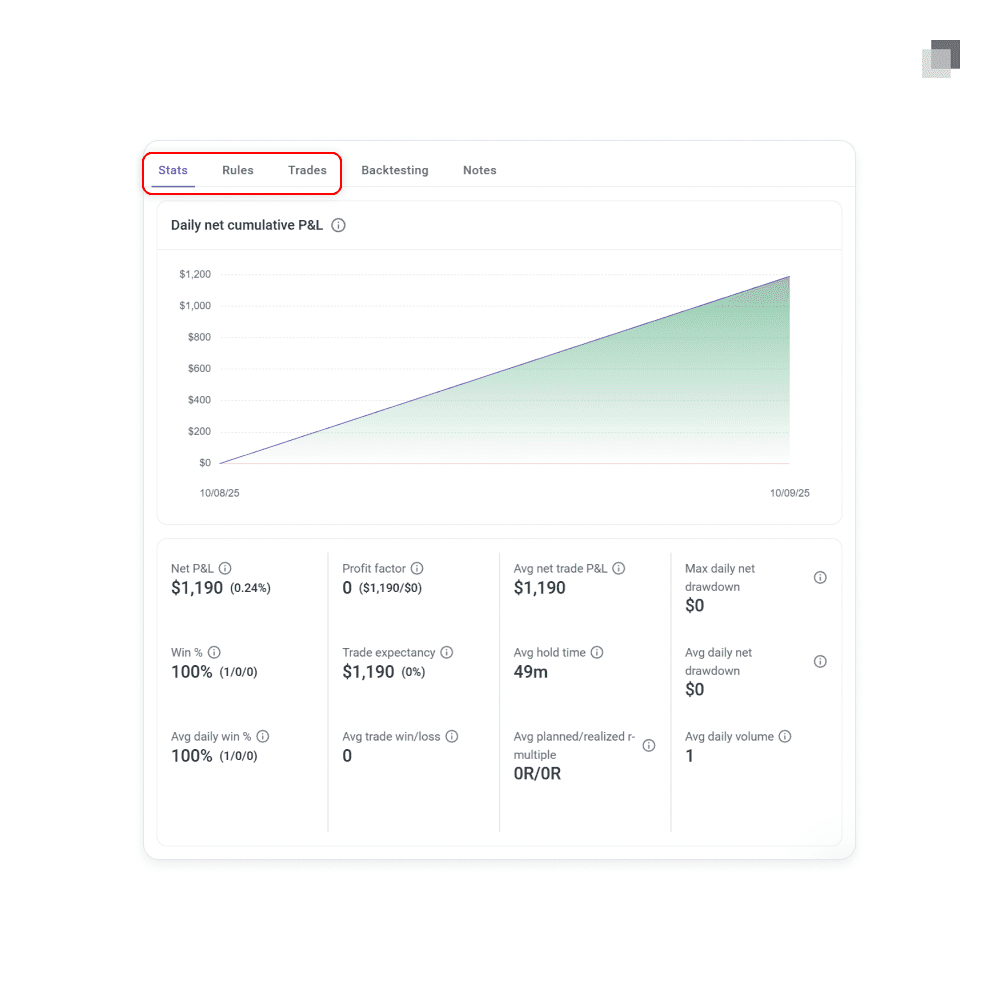
The other way to leverage attached strategies to your trades is within the dashboard and report pages. In the filter on the top right header of the page, you will see a strategy dropdown within it. Selecting certain strategies will filter the data to only show trades taken under the specific model.
The other way to leverage attached strategies to your trades is within the dashboard and report pages. In the filter on the top right header of the page, you will see a strategy dropdown within it. Selecting certain strategies will filter the data to only show trades taken under the specific model.
The other way to leverage attached strategies to your trades is within the dashboard and report pages. In the filter on the top right header of the page, you will see a strategy dropdown within it. Selecting certain strategies will filter the data to only show trades taken under the specific model.
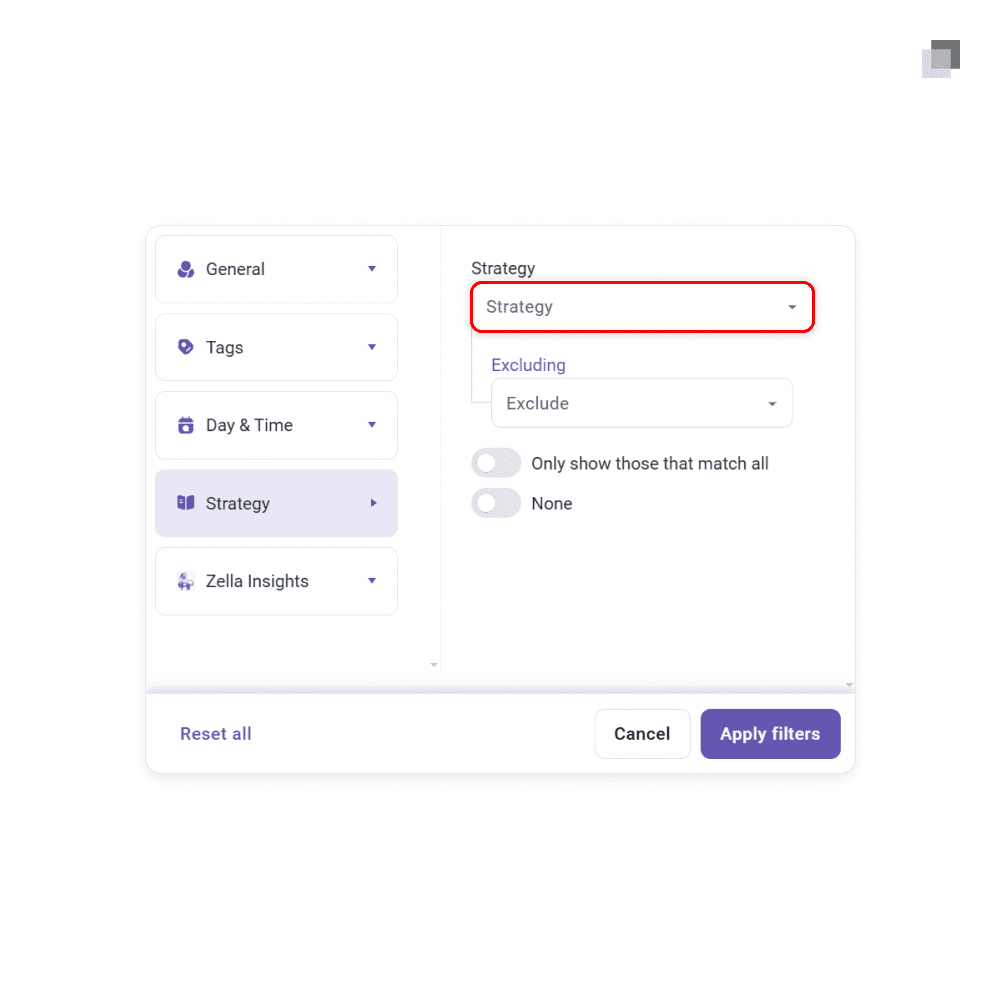
Both methods should be used in your process to study and review your own trading data.
Both methods should be used in your process to study and review your own trading data.
Both methods should be used in your process to study and review your own trading data.

The standard for trading education and guidance
2026 The Market Lens - All Rights Reserved
The standard for trading education and guidance
2026 The Market Lens - All Rights Reserved
The standard for trading education and guidance