


Calendar Settings
Calendar Settings
Calendar Settings
Setting up the economic calendar
Setting up the economic calendar
Setting up the economic calendar
Lesson 1
Lesson 1
Lesson 1
15 min
15 min
15 min
Default Settings
Default Settings
Default Settings
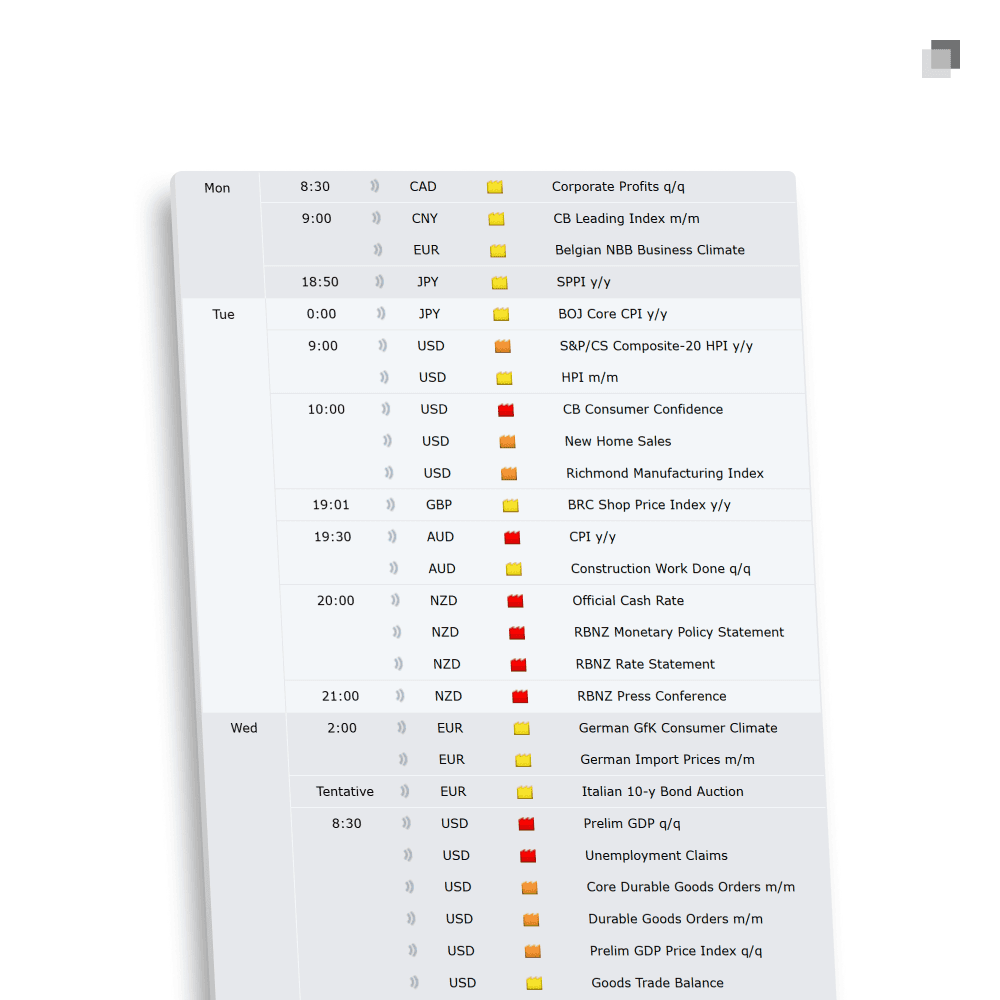
The goal of adjusting the format of the economic calendar is to remove all the noise which is present on the standard settings. Most of the events which occur throughout the week either do not hold enough significance to take it into account or they do not have any impact on the market you are trading. All you want on your economic calendar is red folder news events which are relevant to the market you trade.
The goal of adjusting the format of the economic calendar is to remove all the noise which is present on the standard settings. Most of the events which occur throughout the week either do not hold enough significance to take it into account or they do not have any impact on the market you are trading. All you want on your economic calendar is red folder news events which are relevant to the market you trade.
The goal of adjusting the format of the economic calendar is to remove all the noise which is present on the standard settings. Most of the events which occur throughout the week either do not hold enough significance to take it into account or they do not have any impact on the market you are trading. All you want on your economic calendar is red folder news events which are relevant to the market you trade.
Step 1: Remove orange and yellow folder news events
Step 1: Remove orange and yellow folder news events
Step 1: Remove orange and yellow folder news events
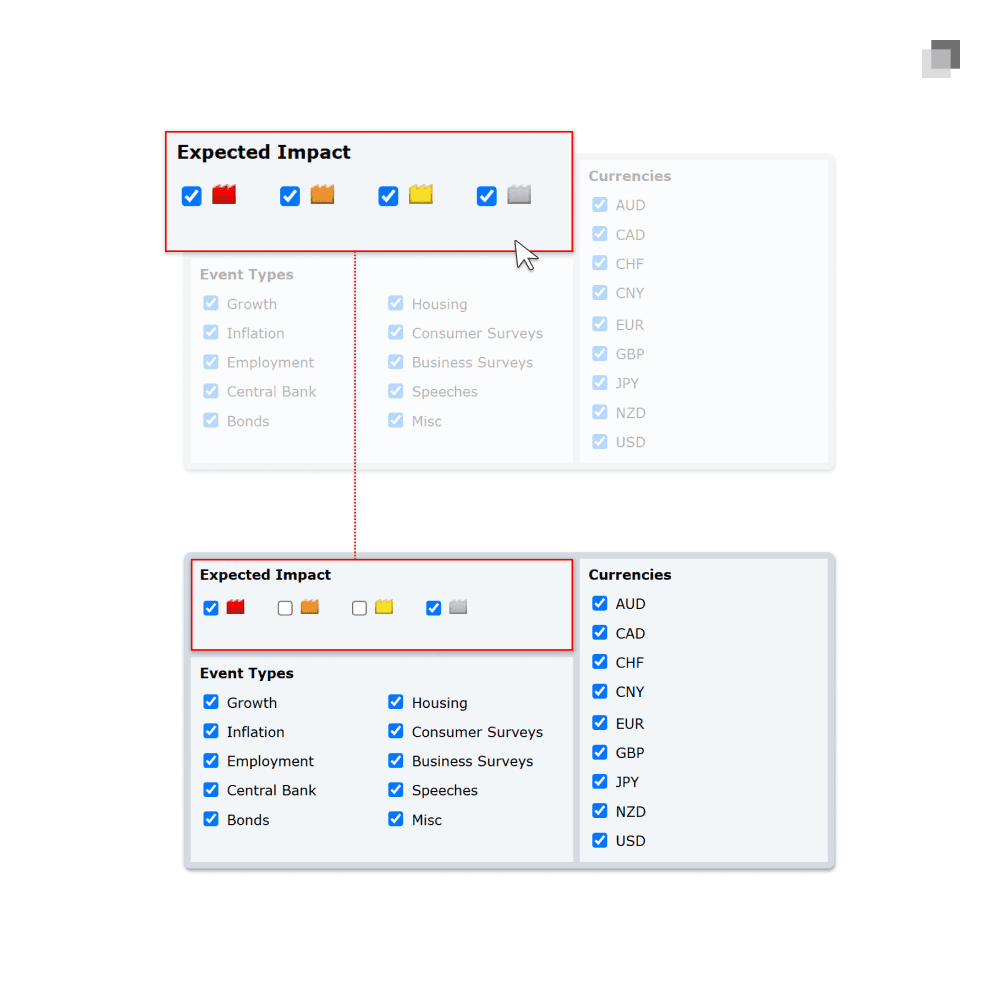
Both orange and yellow folder news events are not weighed heavy enough by the market to be considered relevant on a consistent basis. Removing them will significantly clear up the default economic calendar. The goal is to understand when volatility will enter into the market and red folder news is the only level of impact which needs to be concerned. While gray folder does not indicate the time of a news event, it provides a reminder for days that results in scenarios such as closed market days, half market days, or low volatility periods.
Both orange and yellow folder news events are not weighed heavy enough by the market to be considered relevant on a consistent basis. Removing them will significantly clear up the default economic calendar. The goal is to understand when volatility will enter into the market and red folder news is the only level of impact which needs to be concerned. While gray folder does not indicate the time of a news event, it provides a reminder for days that results in scenarios such as closed market days, half market days, or low volatility periods.
Both orange and yellow folder news events are not weighed heavy enough by the market to be considered relevant on a consistent basis. Removing them will significantly clear up the default economic calendar. The goal is to understand when volatility will enter into the market and red folder news is the only level of impact which needs to be concerned. While gray folder does not indicate the time of a news event, it provides a reminder for days that results in scenarios such as closed market days, half market days, or low volatility periods.
Step 2: Choose the currencies which correlate to the market you trade
Step 2: Choose the currencies which correlate to the market you trade
Step 2: Choose the currencies which correlate to the market you trade
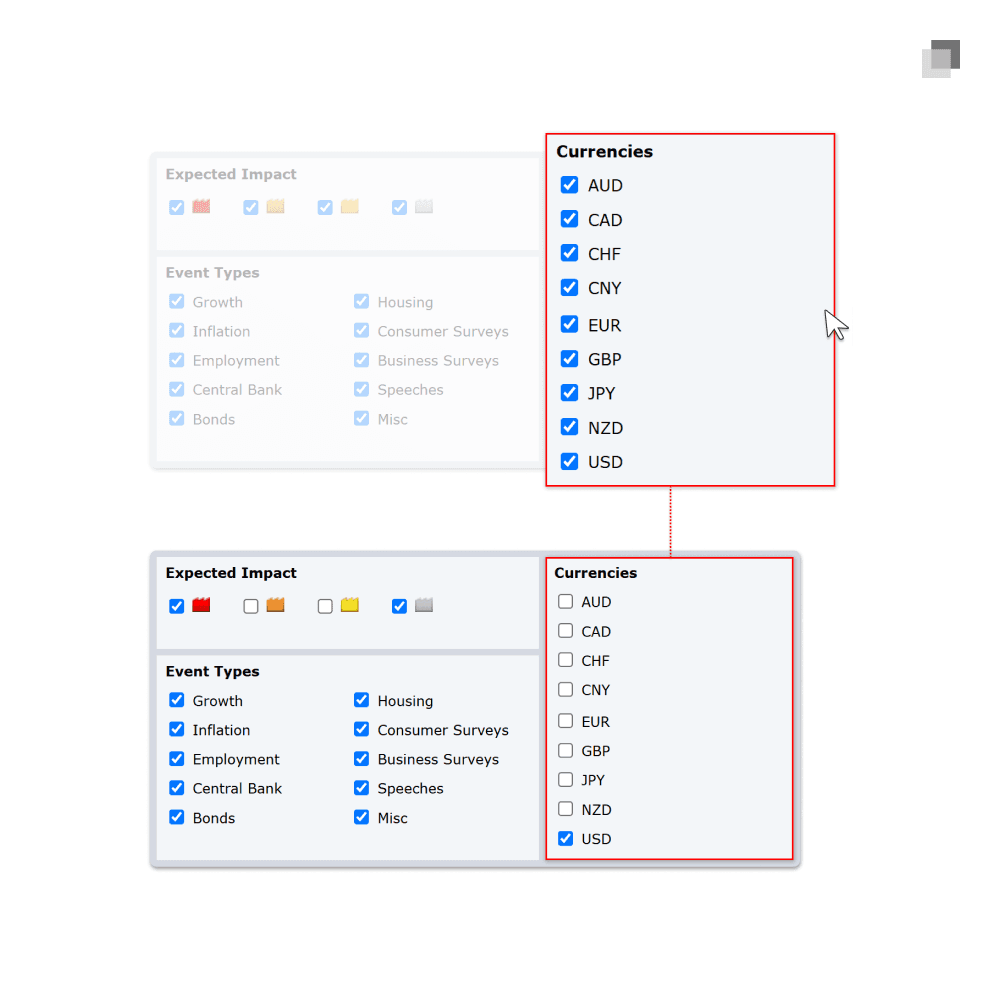
While still in the filters window, the currencies section can be seen on the right. In the same way that orange and yellow folder news events create too much unnecessary noise on the economic calendar, the majority of currencies do not have any effect on a specific market being traded. Unselect any currency from the default settings which does not have relevance to your trading.
While still in the filters window, the currencies section can be seen on the right. In the same way that orange and yellow folder news events create too much unnecessary noise on the economic calendar, the majority of currencies do not have any effect on a specific market being traded. Unselect any currency from the default settings which does not have relevance to your trading.
While still in the filters window, the currencies section can be seen on the right. In the same way that orange and yellow folder news events create too much unnecessary noise on the economic calendar, the majority of currencies do not have any effect on a specific market being traded. Unselect any currency from the default settings which does not have relevance to your trading.
Step 3: Selecting the correct currencies
Step 3: Selecting the correct currencies
Step 3: Selecting the correct currencies
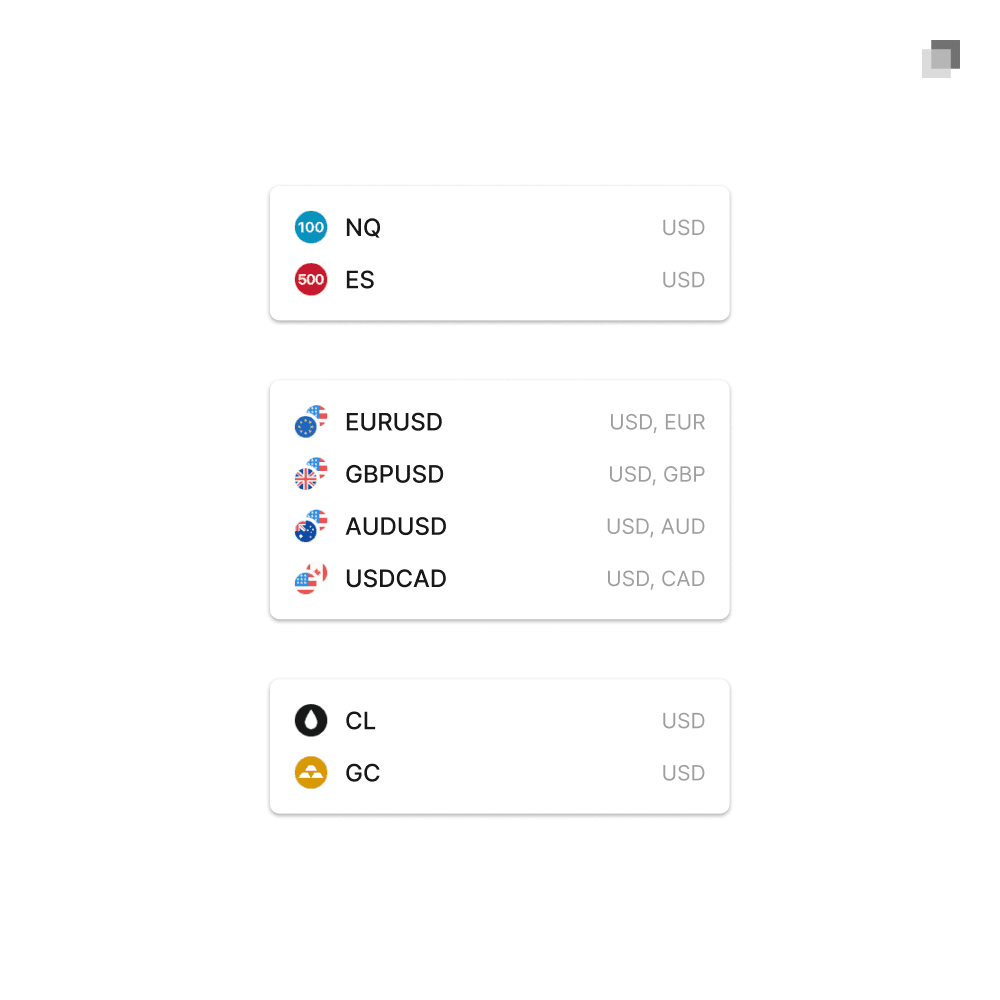
The image below provides an example of how to choose the correct currencies on the economic calendar to only show news which is relevant to the market you are trading. For indices, apply USD for the currency as these will directly impact this market. For forex, apply the two cross currencies on the pair being traded. For commodities such as gold and oil, apply USD as the currency as it will have an indirect impact on this market.
The image below provides an example of how to choose the correct currencies on the economic calendar to only show news which is relevant to the market you are trading. For indices, apply USD for the currency as these will directly impact this market. For forex, apply the two cross currencies on the pair being traded. For commodities such as gold and oil, apply USD as the currency as it will have an indirect impact on this market.
The image below provides an example of how to choose the correct currencies on the economic calendar to only show news which is relevant to the market you are trading. For indices, apply USD for the currency as these will directly impact this market. For forex, apply the two cross currencies on the pair being traded. For commodities such as gold and oil, apply USD as the currency as it will have an indirect impact on this market.
Finalized Economic Calendar
Finalized Economic Calendar
Finalized Economic Calendar
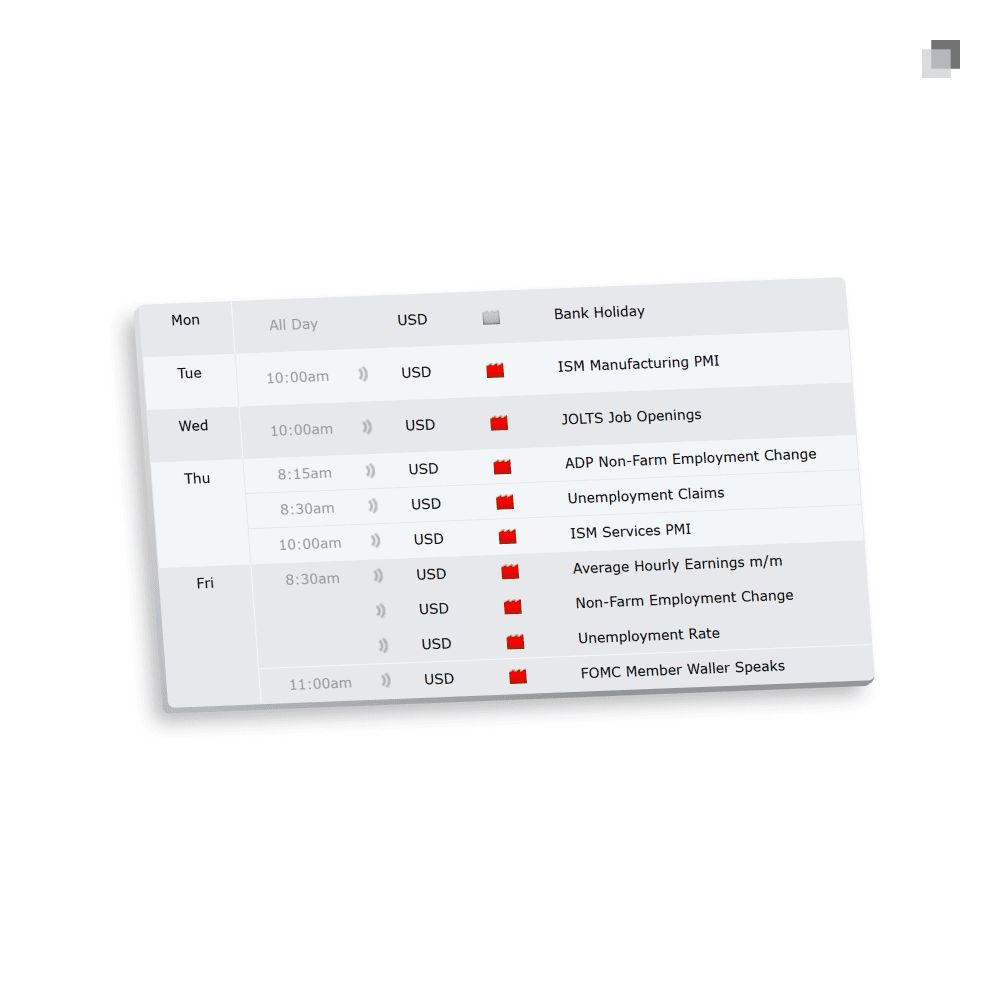
After all of the previous simple steps are complete, you will have an economic calendar which only displays red folder news events and gray folder days within the current week for the market you trade.
After all of the previous simple steps are complete, you will have an economic calendar which only displays red folder news events and gray folder days within the current week for the market you trade.
After all of the previous simple steps are complete, you will have an economic calendar which only displays red folder news events and gray folder days within the current week for the market you trade.

The standard for trading education and guidance
2025 The Market Lens - All Rights Reserved
The standard for trading education and guidance
2025 The Market Lens - All Rights Reserved
The standard for trading education and guidance
2025 The Market Lens - All Rights Reserved
The standard for trading education and guidance